
Start writing here...
Introduction
This n8n workflow uses n8n built in nodes and data table to monitor websites. Schedule trigger and http nodes will allow us to check the status of the websites, while the data table will allow us to store information regarding the status and downtime for clean notifications. The data table stores a list of websites you'd like to monitor, making it easy to add new or remove existing websites from the monitoring system.
Workflow Download
You can import the workflow by downloading it bellow. The nodes include notes for additional information. Don't forget to setup the data Table in the next step for the workflow to work:
Creating the Data Table
Create a data table in n8n with the following columns:
- website_url text column
- status_code as number column
- downtime_start as datetime column
Or you can import the following example data table (it is monitoring some of my favorite websites):
After adding the data table, make sure it is selected in the data table nodes within the workflow.
Workflow explained
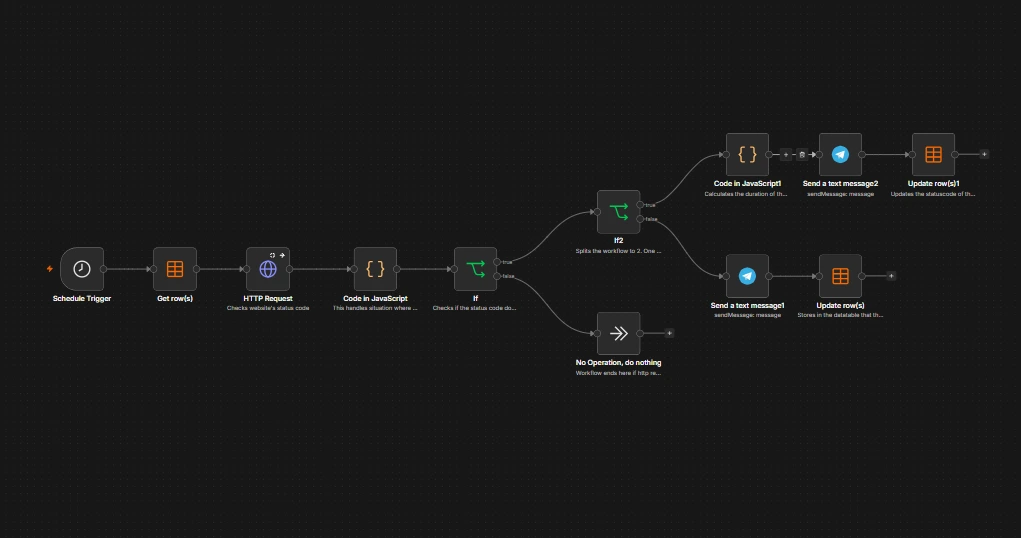
Let me explain each node:
- Schedule trigger starts the workflow after a period of time, I have the trigger set each minute.
- Get rows fetches the data from our data table we've created, which includes data about the website url, its last recorded status and downtime time.
- HTTP Request node checks the status code of the website. It is set to Always Output Data, because it is possible that no data is returned in some cases, such as server being down or unreachable.
- JS node is used to set the status code to 0(zero) if it is anything other than 200, this means that if the previous http node has a value other than 200 or no value at all (server not reachable) it will set the status code to 0. The logic behind this is simple, if the status code is anything other than 200, then the website is having issues, regardless of what status code it is.
- If node compares the current status code with the status code stored in the data table. If the status codes do not match then it means there has been a change from the previous trigger, and if the codes match then it means nothing has changed since the previous trigger, which takes the workflow to the Do Nothing node.
- Second If condition checks if the status code is 200 or not. If it is 200, then the website was down and it is back online. If it is not 200, then the website was online and now it is down.
- Down scenario, send a critical message in telegram to inform the user that the website is down, then the data table is updated to store the new status code and the datetime of the downage.
- Back online scenario, JS node calculates the downtime duration by subtracting current time with the data table stored time. Next a telegram message is sent to inform the user that the website is back online and includes the downtime duration. The data table node updates the website's status code to 200.
Additional notes
The workflow is designed to reduce spam by using the data table persistent storage to check if the website status has changed or not, therefor sending notification only on change.
I've included notes on some nodes for additional information regarding them.
The workflow is using telegram nodes for notification which can be replaced with other mediums like email, slack etc...